chevron_left 账号设置
创建账号
创建账号
-
How do I create a student account on Homadorma?
Exploring homestays on Homadorma is simple and always free. Here's a step-by step tutorial of how to list create a student account:
- If you haven't signed up on Homadorma, Sign up here: Register as a student
- You will receive an email in your inbox asking you to activate your account. Click the link in the email to activate your account
- Log in and go to My Profile page
-
Fill out your basic information. It helps you find a good match
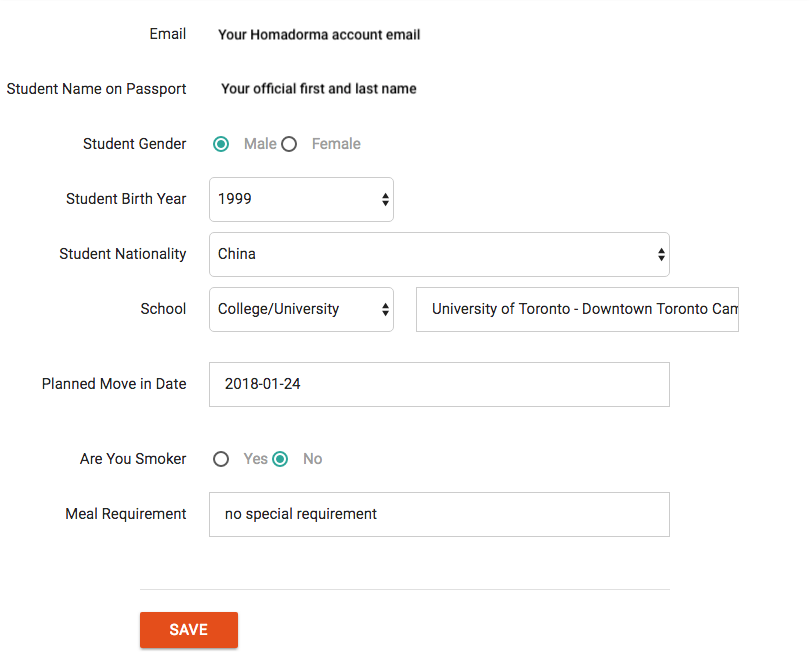
- Click SAVE
-
I can not find my school.
If you’re having trouble finding your school, here are a few suggestions:
- Make sure you choose the right destination category. For example, if you are searching city of Toronto, it’s under City category. Some schools named with “college” at the end, but they are actually secondary school;
- Search school name in English (or in French for schools in Quebec);
- Double check the spelling of your school name;
- If the above still doesn't help, get help here
-
I do not know my Move-In date.
If you haven’t decided your Move-In date yet, choose a future date on the calendar. We suggest you discuss with the hosts during your homestay finding. It’ll help you to you will have a better idea.
Once you know your date of Move-In, you can update it in your Homadorma account at a later time.
To update your Move-In Date, go to your profile on homadorma.com and select the new date.
Update my Move-In Date
没找到您要的答案?联系我们的学生服务寻求帮助吧!